Get started with Power Automate
8 April 2022 | Noor Khan


Power Automate is an online suite offered by Microsoft as part of the Microsoft Power Platform which includes Power Apps (application development), Power BI (business intelligence and data reporting) and Power Virtual Agents (intelligent virtual agents). The combined use of these platforms offered by Microsoft can provide unrivalled benefits and enhance business processes.
At Ardent, we have used Microsoft Power Platforms to deliver fully integrated, automated software solutions. Some of the solutions we have delivered using the Power Platforms include a HR onboarding and performance management system for a leading food manufacturer client, as well as, a case management system for communication with clients for a leading accountancy and law firm.
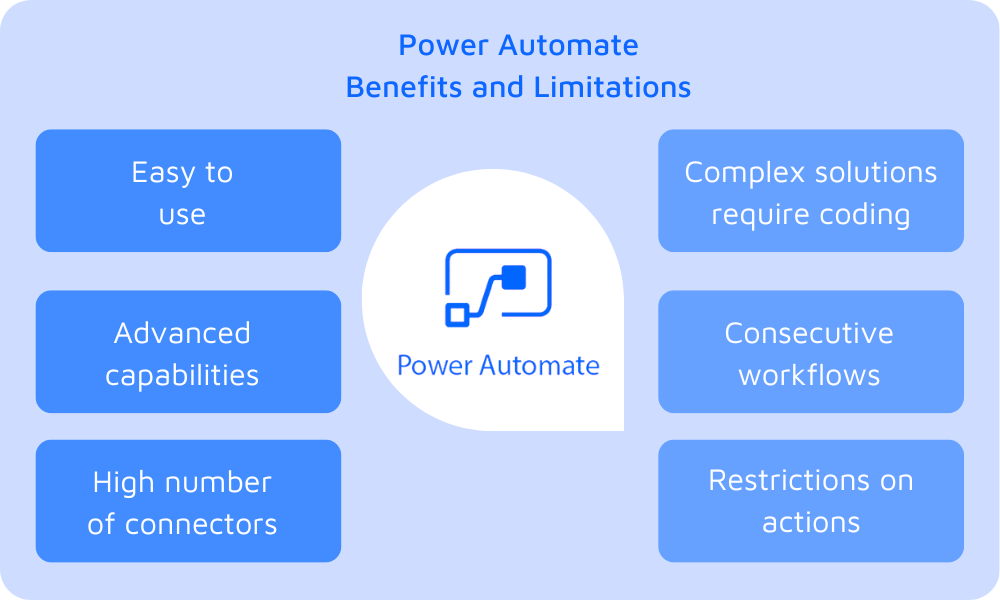
Here we will look at Power Automate and give an overview of the suite including the benefits on offer and the limitations it has.
What is Power Automate?
Power Automate, formerly known as Microsoft Flow facilitates the automation of workflows to save businesses time by streamlining their processes. It helps businesses reduce manual, repetitive tasks to allow them to boost productivity and improve efficiency. Low code, drag and drop platform enables all users to easily build automated processes.
The great thing about Power Automate is that it enables the apps within Microsoft Office 365 to communicate with each other to automate processes, and this can be done easily without any expert technical or data engineering skills. However, with advanced skills, businesses can leverage the Microsoft Power Platform to enhance business processes further.
Benefits of Power Automate
There are several benefits that Power Automate offer if you are looking to automate and streamline your business processes and they include:
- Easy to use for beginners – Power Automate is built with beginners in mind so it is aimed at a variety of users who may not have expert technical skills.
- Advanced capabilities – Although, it’s made for beginners, as part of the Power Platform it can create powerful solutions with advanced capabilities.
- A high number of connectors – It can be connected to over 200 external connectors such as Facebook, Salesforce, SQL Server and Dropbox.
- Cost-efficient – Power Automate is considered cost-efficient, especially for its capabilities with the starting price of $15 per month per user.
- Automate and streamline processes – Businesses can reap the rewards of increased productivity in the workplace with automated and streamlined internal processes.
- No-code app builder – Adding to the ease of use, anyone can easily build an app without any coding knowledge making it easy to use for all employees.
- Easy integration with Microsoft Office Apps – Power Automate is easily integrated with Microsoft Office Apps including the most commonly used Word, Excel, PowerPoint and more.
Limitations of Power Automate
There are also some limitations to consider when looking at Power Automate for your business automation solution and they include:
- Restriction on number of actions – You are restricted to 250 actions per workflow. Although this may seem like a large number, this can be problematic when workflows have several loops.
- Only consecutive workflows – You are not able to take a step back in a workflow process. You can work around this with loops, however, this will require further work.
- Coding knowledge required for complex solutions – You will need coding skills and expertise if you are looking to build solutions that are more complex.
Ardent Power Automate services
Ardent’s highly experienced engineers have leveraged Microsoft Power Platform to deliver fully automated, robust software solutions to many clients. If you are looking to develop software to automate your internal business processes, get in touch to find out how we can help.
Explore our software development services.
Ardent Insights
Data Warehousing Architecture: Azure SQL vs Redshift
There are quite a few different data warehouse technologies to choose from, and knowing where to start, what to look for, and what data warehouse service is going to be best for your business is key. Deciding on a data warehousing technology that is suitable to your business needs, goals and objective is essential as [...]

Data Warehouse vs Database: The key differences
Cloud technology and advances in hybrid-storage technologies have meant that data storage is no longer left entirely to internal equipment and a single company-owned server. Finding a database management solution that works with the size and scale of your needs is not a task to be overlooked. [...]

Building data pipelines – a starting guide
Data visibility can be a huge driving factor for organisation growth. Poor data visibility can lead to a lack of compliance with data security, difficulty in understanding business performance and increased complexity in dealing with system performance issues. Developing secure, robust and scalable data pipelines can empower businesses to gain data visibility by connecting the [...]
Services
About
UK
US
India

